
Chores
Go to Admin › Chores › Add a chore.
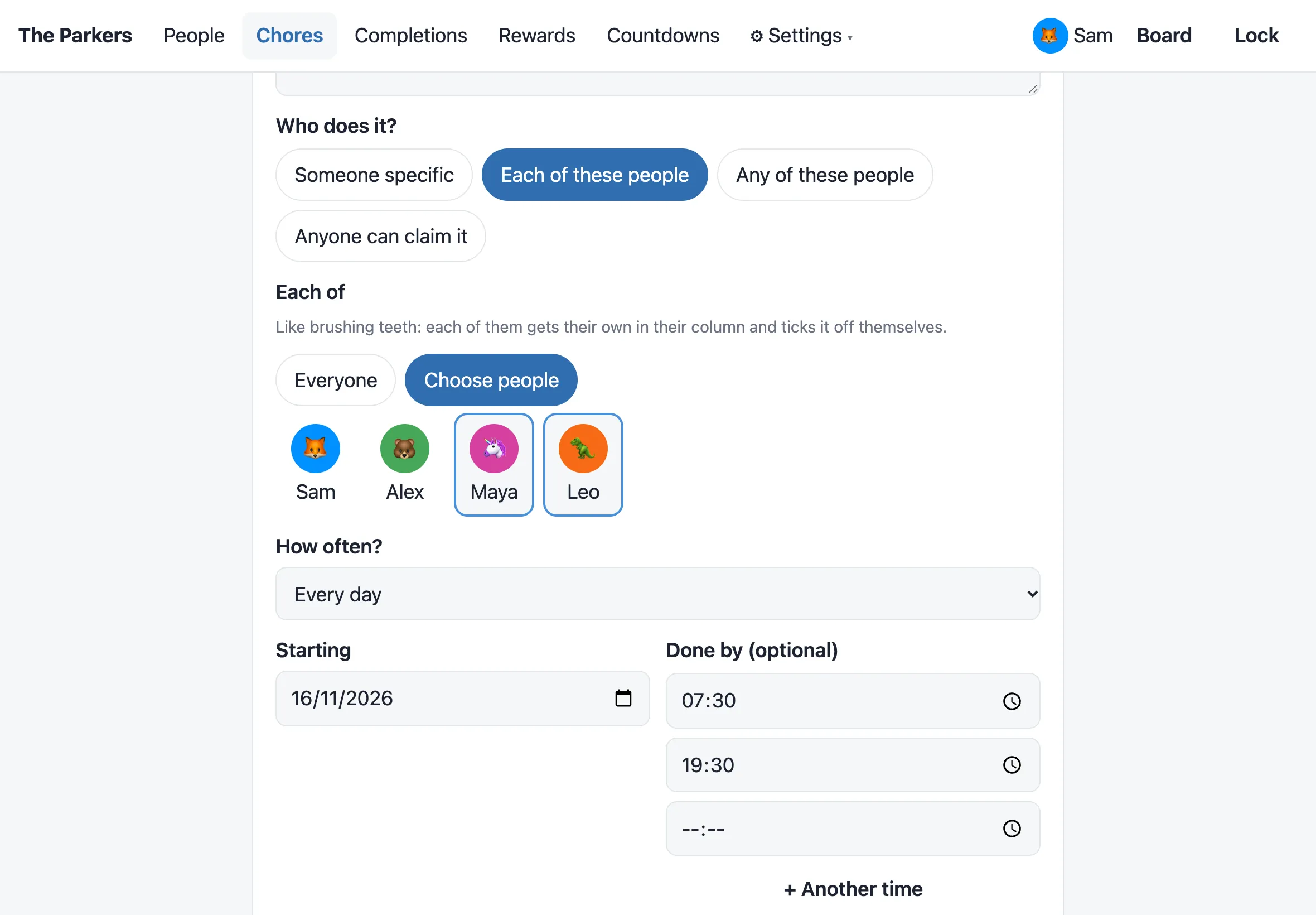
What needs doing? is the title on the board. Pick an emoji from the grid or type any emoji. As you type the title, Ingle suggests one (“Feed the dog” → 🐶).
Who does it?
Section titled “Who does it?”- Someone specific: it shows in their column.
- Each of these people: for chores everyone does, like brushing teeth or making the bed. See below.
- Any of these people: for jobs that belong to a few people, like “School run” for both adults. Tick two or more. It shows in each of their columns, and whoever ticks it off first gets the points. It’s then gone from the others’ columns.
- Anyone can claim it: it goes in Up for grabs, and anyone can claim it or just do it.
Each of these people
Section titled “Each of these people”One chore, done by each person separately. Choose Everyone, or Choose people and tick who.
- Each of them gets their own card in their column and ticks it off themselves. One person doing theirs doesn’t tick it off for anyone else.
- With Everyone, anyone added to the household later gets it too, and anyone archived stops getting it.
- Children earn the chore’s points and pocket money, and adults earn its Adults’ points, as with every chore. See What it’s worth.
- Times, Show it on the board, Only on the day, checking by an adult, the calendar and Admin › Completions all work for each person separately.
The difference from Any of these people is how many times it’s done: Each is done once by every one of them, Any is done once by whichever of them gets there first.
If you’ve been keeping a copy of the same chore for each person, set up the one chore, then archive the old copies.
How often?
Section titled “How often?”- Just once, on a date.
- Every day or Weekdays (Mon–Fri).
- Weekly or Every 2 weeks, on the days you tick.
- Monthly, on a day of the month, or the last day.
For a weekly, fortnightly or weekday chore, Which days? sets how often it’s due:
- Every day ticked: due on each of them.
- Any one of these days: due once that week, on whichever day suits. “Hoover the stairs, Tue or Thu” shows on both days, labelled “Today or Thu”, until someone does it. Its last day says Last chance.
Starting is the first day it’s due.
Done by (optional) is a time, such as 18:30, and the card shows it.
+ Another time adds more, up to 6 a day. Brush teeth at 07:30 and 19:30 is one chore with two cards a day. Each time is done, claimed, missed and checked separately, and each earns the chore’s points. Admin › Completions and My money show which one it was (“Brush teeth · 19:30”), and a done card shows “Done · 19:30”. A chore done on Any one of these days can have only one time.
Show it on the board keeps a timed chore off the board until it’s near, so the evening one isn’t there at breakfast. Choose All day, 2 hours before, 1 hour before or 30 minutes before each of its times. New chores start at 1 hour before: a 19:30 chore then appears at 18:30. Until then it isn’t on the board and isn’t counted in “left today”. Displays add it by themselves when it’s time. It doesn’t apply to chores done on any one of their days, which show all day.
After its time, a chore stays on the board until it’s done, and shows as Overdue from the next day. Only on the day changes that: for chores that can’t be done late, like putting the bins out, the card says Until 20:00 (or Today only without a time), and once it’s too late it comes off the board as missed. Admin › Completions lists the last week’s missed chores.
What it’s worth
Section titled “What it’s worth”- Points and Pocket money (£): what a child earns. Either can be 0, so a chore can be just a reminder.
- Adults’ points: what an adult earns. Adults earn points only, never money, so a grown-up’s teeth don’t cost you 20p.
The form shows only what applies: a chore for one adult shows only Adults’ points, a chore for one child shows only Points and Pocket money, and anything else shows all three. On a new chore, Adults’ points follow Points until you change them. The board shows each person what they’d earn, in their column and in the Up for grabs picker.
- An adult checks it before points or money are given: the chore waits for a grown-up to approve it. See The board.
Archive removes a chore from upcoming days. Anything already done stays in the history.
Going away? Holiday mode pauses chores for everyone, or for one person, without archiving anything.
The chores list
Section titled “The chores list”Admin › Chores lists every chore, with who does it, how often and its times, such as “Each: Mum, Dad and Thomas · Every day · by 07:30 and 19:30 · shows 1 hour before”.
The chips at the top show Everyone, one person, or Up for grabs, and the menu sorts by name, points or money. Filtering by a person includes the chores they share with others. Someone with no chores gets an Add a chore for… button with them already picked.